Destiny® Failover Support White Paper
Configuring a Hot Spare Application Server
Failover support has been included in Destiny beginning with version 8.0. Failover allows the configuration of a hot spare application server. This hot spare will monitor the primary application server and activate if the primary server fails to respond to user requests.
Components of a Failover Server
Failover support requires:
- Failover Device
- Destiny Server (Active/Passive) Pair
- Microsoft SQL Server Cluster
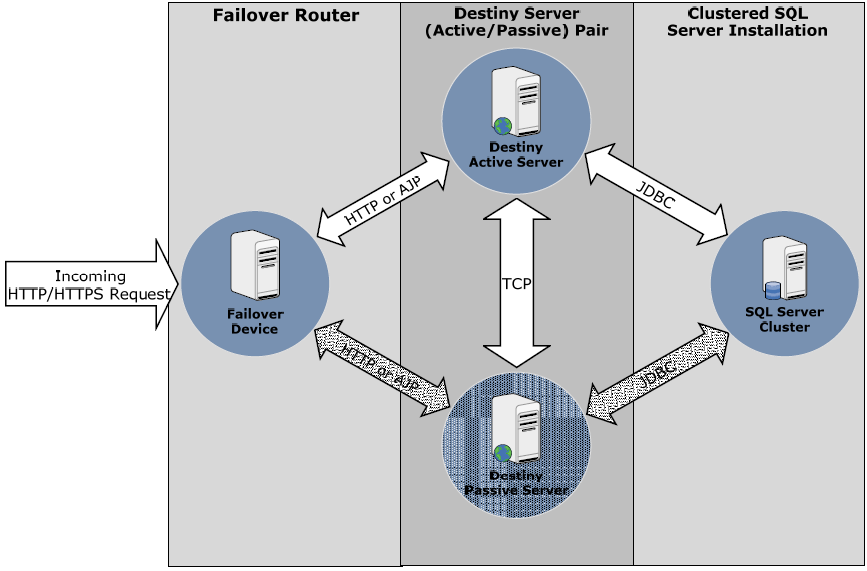
Here is an illustration of the components of the failover server:
Using Destiny and the Failover Solution Approach
The failover solution provides a hot spare for the Destiny application server. A third party failover device is required to direct network traffic to the spare in the event of an outage on the active Destiny application server. It should be noted that this does not provide load-balancing or active session replication. However, this approach can significantly reduce the downtime associated with a catastrophic hardware failure and provide an automated response to application server downtime.
Since active sessions are not replicated from the active server to the passive server failover will not be transparent to active end users. When a failover occurs this process is invoked to transition from the active to passive instance:
- The passive application server builds/initializes its connection pool on the SQL Server database cluster.
- If the Active server continues to maintain connections to SQL Server the passive server will clear these connections and force stop the active server. (This scenario could be result of a network failure between the failover router and the active server).
Typically, the failover transition will take 1-2 minutes during which active end users will experience a server outage (Either HTTP 404 errors or request that fails to respond). Once the passive server is activated end users will be required to re-authenticate with the passive server.
Data Replication
The primary storage location for Destiny data is the Microsoft SQL Server database. The failover solution delegates database replication to a SQL Server Cluster. The Destiny failover solution does not provide any additional replication of this SQL data.
Supplemental user data is also stored on the Destiny application server. This data can be divided into these categories:
- Keyword data for patron and title search.
- Job input/output data - This includes uploaded import files, export files, and generated reports.
The failover solution maintains replication of this non-SQL data between the active and passive instance.
Component Details
The Failover Router The Failover Router is responsible for directing incoming HTTP request to the active Destiny server instance. In the event the Failover Router determines that the active Destiny server is no longer responding to HTTP request it will direct all future request to the passive Destiny server. The methodology used by the Failover Router to determine that the active server is non-responsive is proprietary and based on the specific router implementation.
The Destiny failover solution is flexible and should work with any load balancer that supports an active/passive failover configuration. Only these load balancers have been tested:
- The F5 Network Appliance
- The Apache Web Server with Tomcat Mod-Proxy
The Destiny Server (Active/Passive) Pair During normal operations the passive Destiny server performs data mirroring of Destiny resource files located on the active server. The resources that are synchronized include: Job files (i.e. Report Output, Import/Export Files, etc.) and Keyword Index Files.
Clustered SQL Server Install Microsoft SQL Server Enterprise edition is a required component of the Destiny failover solution. For details on configuration and support of the SQL Server cluster refer to your Microsoft documentation.
Conclusion
If you have questions or need assistance, call your Follett School Solutions, Inc. technical consultant, who can provide technical specifications, setup guidance and detailed documentation to help your district implement failover support for the Destiny solution. Contact Follett’s Technical Consultants at 800.323.3397.
Technical Support
For technical product issues, including how-to procedures and error reporting:
Destiny email techsupport@follett.com
Destiny International email internationalsupport@follett.com
Phone support 888.511.5114 + Option 2
Customer Service
For ordering and billing/payment issues:
Email softwarecs@follett.com
Phone support 888.511.5114 + Option 1